How Memory Works
Biology lecture · 6 Nov 2026 · 1:39
Overview
Memory involves encoding information, storing it, and retrieving it when needed. The hippocampus supports the formation of new long-term memories.
Record in the room or upload the file afterwards. SummaryNote writes the transcript, turns it into structured notes, and builds flashcards and a quiz from the same note.
First complete note freeNo card needed
Free: audio or video up to 3 hours per file. Pro: up to 5 hours. Max file 500 MB.

Three steps from a recording to a note you can study, ask and share.
Record on Android or in your browser, or upload audio, video, a PDF or a YouTube link. Recordings need at least 30 seconds.
Memory involves encoding information, storing it, and retrieving it when needed. The hippocampus supports the formation of new long-term memories.
A transcript with speakers and timestamps, then a summary organized by the topics that came up.
Flashcards, a quiz and answers with sources. Export to PDF, DOCX or Markdown for free.
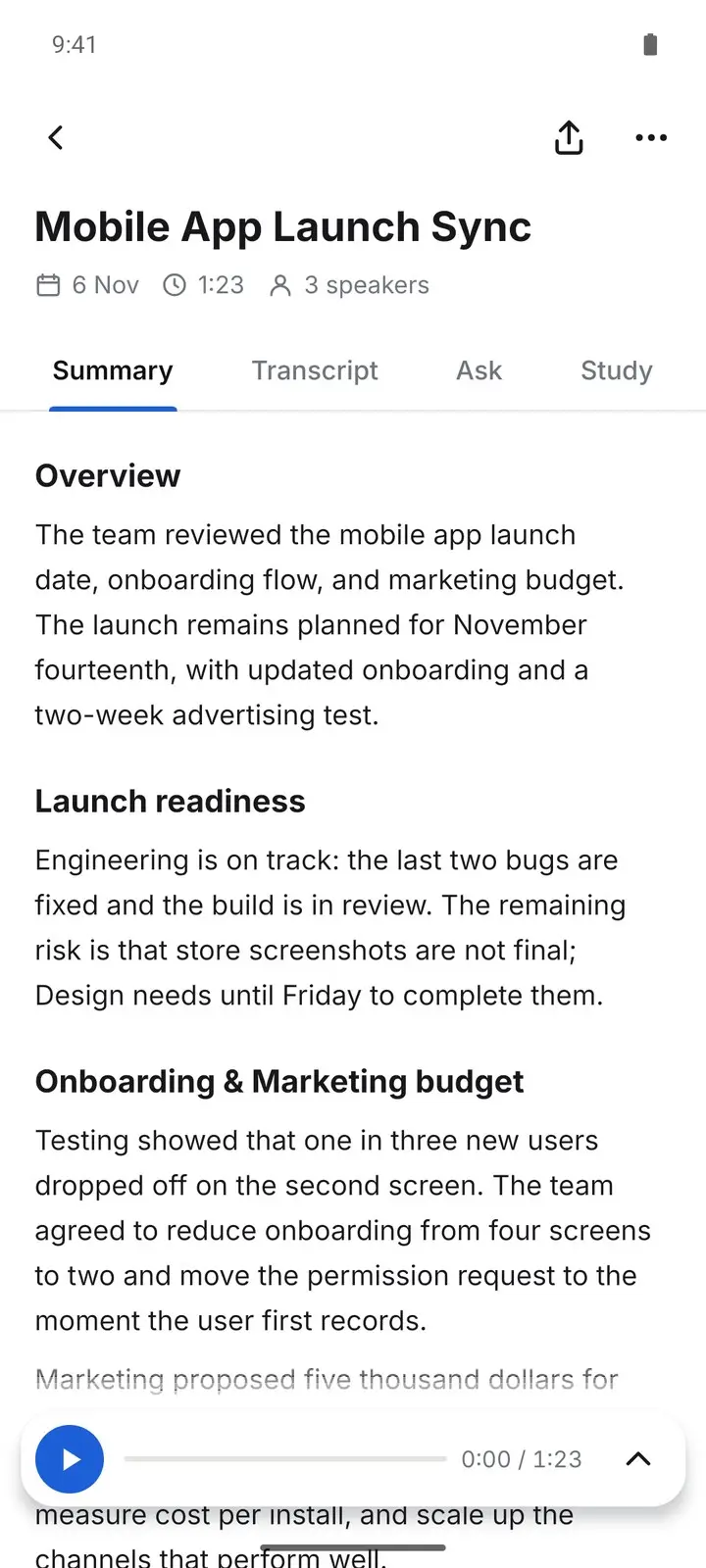
Example from SummaryNote: the first 30 seconds of a product meeting, and part of the summary for the full recording.
Okay, let’s get started. This is the launch sync for the mobile app. We have three things today: the launch date, the onboarding flow, and the marketing budget.
On the date, engineering is on track. The last two bugs are fixed and the build is in review. I’d like to keep November fourteenth as the launch day.
Great. Does anyone see a risk with the fourteenth?
Only one. The store screenshots are not final yet. Design needs until Friday to finish them.
The team reviewed the mobile app launch date, onboarding flow, and marketing budget. The launch remains planned for November fourteenth.
Engineering is on track: the last two bugs are fixed and the build is in review. The remaining risk is that store screenshots are not final; Design needs until Friday.
One in three new users dropped off on the second screen, so onboarding goes from four screens to two.
Every note can become flashcards and a multiple-choice quiz built from what was said, so revision starts from your own material.

Two features for live conversations, in the Android app with a Pro subscription.

Paste a Google Meet or Microsoft Teams link. The notetaker joins, records the meeting and writes the note when the meeting ends. No calendar connection, no Zoom.

Words appear as people speak, so you can follow a lecture or an in-person meeting. The full note is written when you stop.
Limits apply to each file. Where a source only works in the Android app, the table says so.
| Source | Formats | Limit | Where |
|---|---|---|---|
| Audio | MP3, M4A, WAV, OGG, AAC, WEBM, 3GP | Free: up to 3 hours. Pro: up to 5 hours. Max 500 MB. At least 30 seconds. | Android and web |
| Video | MP4, MOV, WEBM, MKV, 3GP | Free: up to 3 hours. Pro: up to 5 hours. Max 500 MB. | Android |
| YouTube | Links to videos with captions | Summary in any of 12 languages | Android |
| Up to 300 pages and 20 MB | Android and web | ||
| Documents | DOCX, TXT, Markdown | Up to 20 MB | Android and web |
| Online meetings | Google Meet or Microsoft Teams link | Pro | Android |

Record lectures, review the summary and quiz yourself before exams.
Notes for students
Decisions and next steps from every meeting, exported to your tracker.
AI meeting notes
Interview transcripts with speakers and timestamps, exported as SRT, VTT or DOCX.
Interview transcriptionUpload a recording on the web and get a transcript and summary.
Web and AndroidAI meeting notesMinutes, decisions and action items from meetings.
Web and AndroidYouTube video summarizerStructured summaries of captioned YouTube videos.
AndroidPDF summarizerSummaries and study tools from PDFs up to 300 pages.
Web and AndroidLecture notes AIRecord a class and study from it the same evening.
AndroidMeeting minutes templateA free template with a filled example.
DOCXAbout the AI note taker.
An AI note taker listens to a recording or a live conversation, writes a transcript, and turns it into organized notes. SummaryNote also builds flashcards and quizzes from the note and answers questions with links to the source.
Your first complete note is free and needs no card. It includes the transcript, summary, study tools, Ask and every export. Pro is a weekly or annual subscription through Google Play.
There is no iPhone app. On any computer, iPhone or iPad you can use the web app in a browser to record or upload audio and add documents. YouTube links, video files and the meeting notetaker are in the Android app.
No. On Android with Pro, you can paste a Google Meet or Microsoft Teams link and the notetaker joins. For Zoom, upload a recording of the meeting afterwards.
Free: up to 3 hours per file. Pro: up to 5 hours. Files can be up to 500 MB. Recordings and uploads shorter than 30 seconds don’t make a note and don’t use your free note.
Summaries for uploads and YouTube videos can be written in 12 languages, including English, Spanish, Portuguese, French, German and Japanese.
Record it on Android or in your browser, or upload the file. Your first complete note is free.
